 google
1. Casing or System Box

ကြန္ပ်ဴတာတစ္လံုးတပ္ဆင္ရန္အတြက္ပံုးအခြံသက္သက္ျဖစ္ပါတယ္။
2. CPU [Central Processing Unit]
![Image result for CPU [Central Processing Unit]](https://cdn.techterms.com/img/lg/cpu_27.jpg)
ကြန္ပ်ဴတာတစ္ခုလံုးမွာတပ္ဆင္ထားတဲ့ ပစၥည္းအားလံုးရဲ႕ တြက္ခ်က္မႈအားလံုးကို လုပ္ေဆာင္ေပးပါတယ္။ CPU တစ္လံုးရဲ႕ ျမန္ႏႈန္းကို MHz(Megahertz) (သို႔) GHz(Gigahertz) ဆိုတဲ့ unit ေတြနဲ႔သတ္မွတ္ပါတယ္။
3. Memory [RAM-Random Access Memory]
ကြန္ပ်ဴတာမွာအသံုးျပဳေနတဲ့စနစ္ေပါင္းစံုကို ျမန္ဆန္စြာဖြင့္ႏိုင္ပိတ္ႏိုင္ေအာင္ ယာယီသိုေလွာင္ေပးထားတဲ့ Temporary Storage Unit ျဖစ္ပါတယ္။ RAM MB(Megabyte) (သို႔) GB(Gigabyte) နဲ႔ သတ္မွတ္ပါတယ္။ သူ႔ရဲ႕ျမန္ဆန္မႈႏႈန္းထားကိုေတာ့ CPU ကအတိုင္း MHz(Megahertz) (သို႔) GHz(Gigahertz) ေတြနဲ႔ပဲတိုင္းတာပါတယ္။
4. HDD [Hard Disk Drive]
![Image result for HDD [Hard Disk Drive]](https://www.deskdecode.com/wp-content/uploads/2016/11/best-500-gb-hard-disk-driev-hdd-min.jpg?w=640)
သူကေတာ့ User Data ေတြ, Files ေတြ, Folders ေတြ, Documents ေတြ, ေဖ်ာ္ေျဖေရး Media ေတြ သိုေလွာင္သိမ္း ဆည္းႏိုင္တဲ့အရာပါ (RAM နဲ႔မတူဘူးေနာ္)။ သူ႔ရဲ႕သိုေလွာင္ႏိုင္မႈ ပမာဏကို GB(Gigabyte) နဲ႔သတ္မွတ္ပါတယ္။ ျမန္ဆန္မႈ ႏႈန္းကိုေတာ့ rpm(Revolution per minutes) နဲ႔သတ္မွတ္ပါတယ္။ သူ႔ရဲ႕ Interface Type ကေတာ့ ၃ မ်ိဳး႐ွိပါတယ္။
1. PATA [Parallel ATA] - IDE/EIDE (40 Pins)
![Image result for PATA [Parallel ATA] - IDE/EIDE (40 Pins)](https://upload.wikimedia.org/wikipedia/commons/thumb/2/29/ATA_on_mainboard.jpg/1200px-ATA_on_mainboard.jpg)
2. SCSI [Small Computer System Interface] -50/68/80 Pins
![Image result for SCSI [Small Computer System Interface] -50/68/80 Pins](https://blogger.googleusercontent.com/img/b/R29vZ2xl/AVvXsEjT8MLhsBzd4RjaxnSWvRg8jOnUU2unNWf_892Ops7cqNK57ExzAX9gRTmAFL75siAG_iEQNuxuqs_OJu5Pg6gBGYL_T8LMZWzgatWS_3XarvV9KQzOhjI9FBKDHmn9FNMpkhkM-YmvcuE/s1600/index.jpg)
3. SATA [Serial ATA] -7 Pins
![Image result for SATA [Serial ATA] -7 Pins](https://vetco.net/spree/products/51318/product_preview_4x3/MRP-SAS29P-271P.jpg)
5. CD/DVD Drive (Read and Write)

CD ေခြ နဲ႔ DVD ေခြေတြကို ဖြင္႔ဖို႔နဲ႔ အေခြကူးဖို႔သံုးပါတယ္။ Read က ဖတ္တာ၊ Write ကေတာ့ အေခြတစ္ေခြကိုယ္တိုင္ ဖန္တီးဖို႔ပါ(အေခြကူးတာကို ေခြ Burn တယ္လို႔လဲေခၚပါတယ္)။ ဒီေနရာမွာ Combo Drive ဆိုတာေပၚခဲ့ပါေသးတယ္။ CD ေခြေတြကို Read/Write လုပ္လို႔ရတယ္၊ DVD ေခြေတြကိုေတာ့ Read လို႔ပဲရတယ္။ အဲဒီ Drive မ်ိဳးကိုေတာ့ Combo Drive လို႔ ေခၚပါတယ္။ CD Disc အခ်ပ္ေတြကို CD-R(Read) နဲ႔ CD-R/W (Read/Write) ဆိုၿပီး ၂ မ်ိဳးခြဲထားပါတယ္။ Capacity အေနနဲ႔ ကေတာ့ 650MB နဲ႔ 700MB ဆိုၿပီးအသီးသီးထုတ္လုပ္ပါတယ္။ Drive ရဲ႕ျမန္ႏႈန္းကို Kbps(Kilobytes per seconds) နဲ႔တြက္ပါတယ္။
6. Floppy Disk
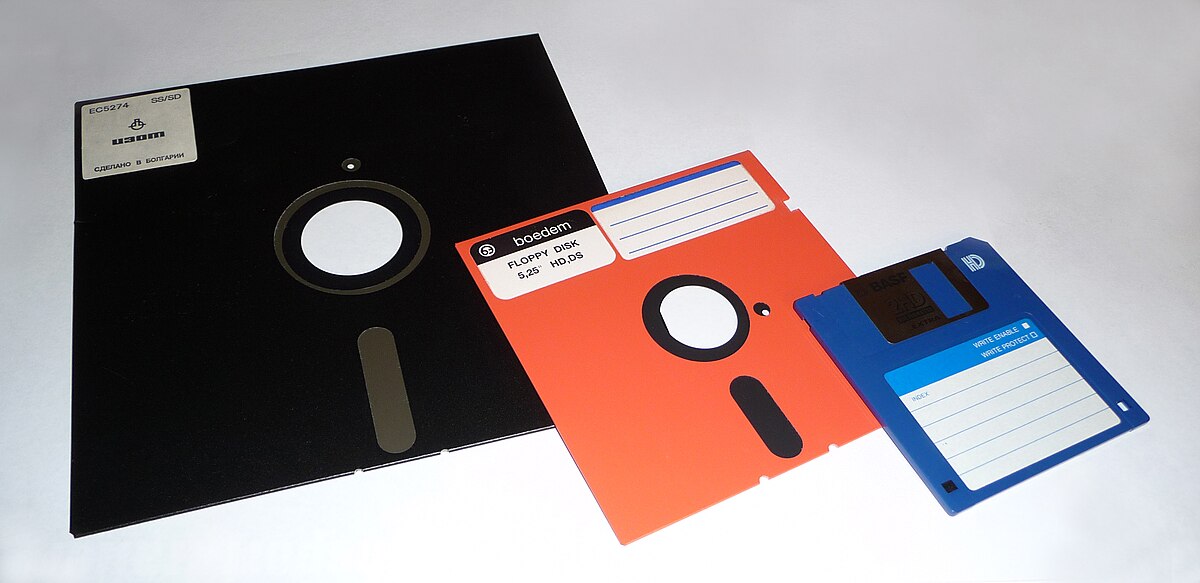
Floppy ကေတာ့ Capacity နဲပါတယ္။ ခုေခတ္မွာလဲ အသံုးနဲပါတယ္။ သူ႔ကိုလဲ Data Storage တစ္မ်ိဳးအျဖစ္ ယခင္ကအသံုးျပဳၾကပါတယ္။ Standard Capacity ကို 1.44MB, Density က Double Sided High Density, Size အေနနဲ႔ 3.5inches ႐ွိပါတယ္။ Speed အေနနဲ႔ 300rpm ႐ွိပါတယ္။
7. Monitor
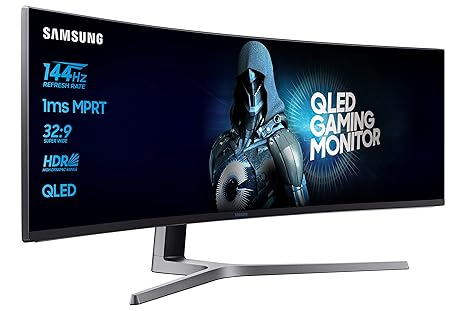
Monitor မွာ ထုတ္လုပ္မႈနည္းပညာကြာျခားခ်က္ေတြအလိုက္ CRT (Cathode Ray Tube), LCD (Liquid Crystal Display) နဲ႔ LED (Light-Emitting Diode) စသျဖင့္ေပၚထြက္လာပါတယ္။
8. Power Supply

Power Supply ကေတာ့ PC အတြက္လိုအပ္တဲ့ DC Power 12v, 5v, 3.3v စတဲ့ပမာဏေတြကို AC Power ကေနေျပာင္းလဲထုတ္ လႊတ္ေပးပါတယ္။ ၿပီးေတာ့ Power Supply မွာက Motherboard နဲ႔ လိုအပ္တဲ့ Devices ေတြအတြက္ Connector ေခါင္းေလးေတြပါပါတယ္။
650W, 700W, 750W, 800W, 1050W, 1275W စသျဖင့္ Watt အားအသီးသီး႐ွိၾကပါတယ္။က်န္တဲ့ Accessories ေလးေတြကေတာ့ CPU Fan တို႔ Casing Fan တို႔ Keyboard+ Mouse တို႔ပါပဲ။CPU Fan ကေတာ့ CPU ကို Heat မတက္ေအာင္ကူေပးတဲ့ပစၥည္းပါ။ Heatsink နဲ႔ Fan နဲ႔တြဲၿပီး CPU ကိုအုပ္ထားတဲ့ကိရိယာေလးပါ။ တခ်ိဳ႕ကေတာ့ မအုပ္ခင္ Thermal Compound ေလး ခပ္ပါးပါးသုတ္လိမ္းေပးၾကပါတယ္။
crd : netcomplus


No comments:
Post a Comment